My heart was stolen by the shores of Kerala, my dreams keep returning to Californian hills, and my soul wonders the streets of Yunnan. My body remained trapped in the concrete jungles of Moscow, but I was lucky to turn the path to the bright coasts of Manabí. What does that leave me with? A path to choose and images to keep.
Tuesday, February 19, 2019
MagicSquire 3 Photoshop panel - work with brushes like never before! Tags, Keyboard Shortcuts, more
Just published BIGGEST update to MagicSquire ever! Tags! Keyboard Shortcuts to individual brushes. Group Collections. Store and sync brushes to Cloud(s), Rotate brush/tool tip with keyboard, more Keyboard Shortcuts, Capture color, even more!
WHAT’S NEW:
NEW! Assign Tags to brushes and then filter them using Search - with Instant Suggestions. Filter out brushes that you don’t need in current project, instantly.
NEW! Collections allow you to combine several groups to a collection, and then switch between group combinations with one click or keyboard shortcut. Use Collection Editor from the menu.
NEW! Keyboard Shortcuts for individual brushes. Also keyboard shortcuts to following new and old features of MagicSquire:
Rotate Brush/Tool tip (works with Clone Tool too)
Turn current Brush into Eraser (and back)
Increase/Decrease Load for Mixer brushes
Switch brushes and collections
more! New shortcuts dialog is accessible from the menu.
NEW! Relocate data folder and put it on Dropbox, iCloud, Google Drive or any other 3rd party Cloud service. Back up and safely auto-sync your brushes between computers!
NEW! Disable size capture for tools, switch between brushes and tools while keeping size
All features available now for Photoshop CS5, CS6, CC, CC2015, CC2017, CC2018, CC2019+
more
Anastasiy’s Photoshop Panels website is all new! Better navigation, better information layout, better access to your favorite Adobe® Photoshop and Illustrator panels for expert brush management, advanced color picking, collecting fonts and more. Loved by industry professionals worldwide!
Did I mention that new MagicPicker 3 is out? OK, maybe it's time to do it! The new MagicPicker is here and it still provides the best and the most advanced color picking solution and color wheel in Photoshop! And now in Illustrator! MagicPicker is now used inside such studios as Square Enix, Crytek, Nokia Design, Sony and many others.
Some new features include:
* Expanded color wheel modes (Box, Triangle, Diamond) for wider color coverage
* Adobe Illustrator CS3, CS4, CS5, CS5.5, CS6, CC support (still supporting Photoshop CS3, CS4, CS5, CS5.5, CS6, CC)
* New Tone Lock feature! Change color's hue while keeping its brightness
* Precise color rulers
And more!
Updates for my panels: MagicPicker color wheel & DiskFonts font manager for Adobe software
What's new: # Fixes a rare bug on Photoshop CS4 when you cannot edit text or select layers. Registered users please check your email
LINK: MagicPicker Photoshop Color Wheel
What's new: # Improves support for FontExpert and fixes various issues on Windows. Registered users please check your email
LINK: DiskFonts font manager
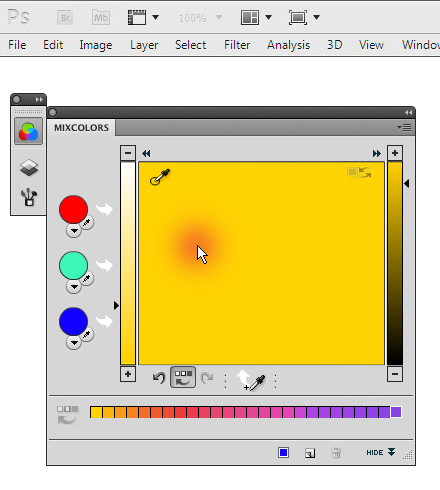
Finally. Mix colors in Photoshop with my new MixColors panel!
What's hot:
# Uses physically accurate engine for mixing colors based on oils, watercolor or acrylics
# Perfectly simple, yet very powerful
# User interaction based on legendary MagicPicker
# Tested, approved and used by Hollywood artists
# Mix colors with Photoshop eyedropper in one click – any color picked with eyedropper will mix to current one in real time!
# Keeps history of recently used colors
# Attach MixColors to MagicPicker to use as one panel
# Keeps history of recently used colors
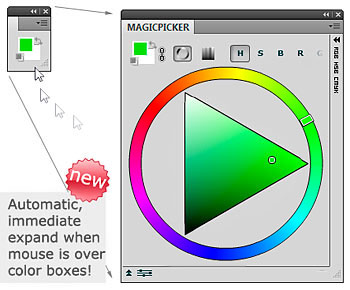
# Compact Mode! Panel takes only 2cm of the screen and expands automatically when mouse is over it
# Color swatches — prepare colors like you do it on real life palette and mix them
# much much more!!
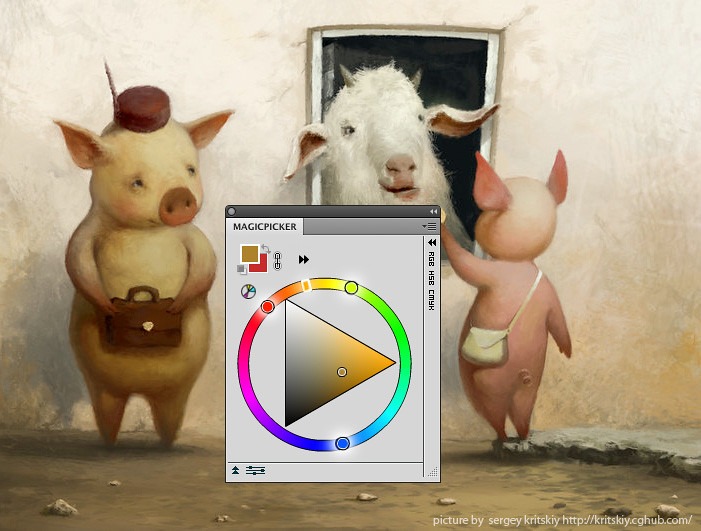
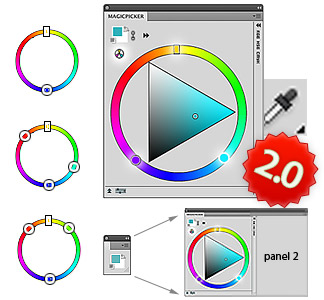
Updated MagicPicker Photoshop Color Wheel panel: v2.0 - Color Schemes and more
(Picture by Sergey Kritskiy)
What's new:
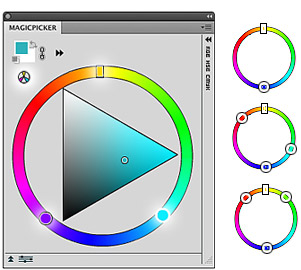
# Switchable Color Schemes: Mono, Complement, Triad, Tetrad, Analogic, Accented Analogic with easy switching!
# Attach other panels to MagicPicker and use them together in Compact Mode
# Much FASTER in CS3, CS4, CS5 and CS5.1
# Returns back keyboard focus to Photoshop CS5, revolutionary changes in Photoshop CS3 support, eyedropper feedback for all Photoshop CS4, better Photoshop CS5.1 support
My MagicPicker color wheel was aquired by legendary Craig Mullins!!! (His site) This is the man who inspired me 10 years ago to go in for digital arts and painting. He made matte paintings for such movies as Forrest Gump and The Matrix.
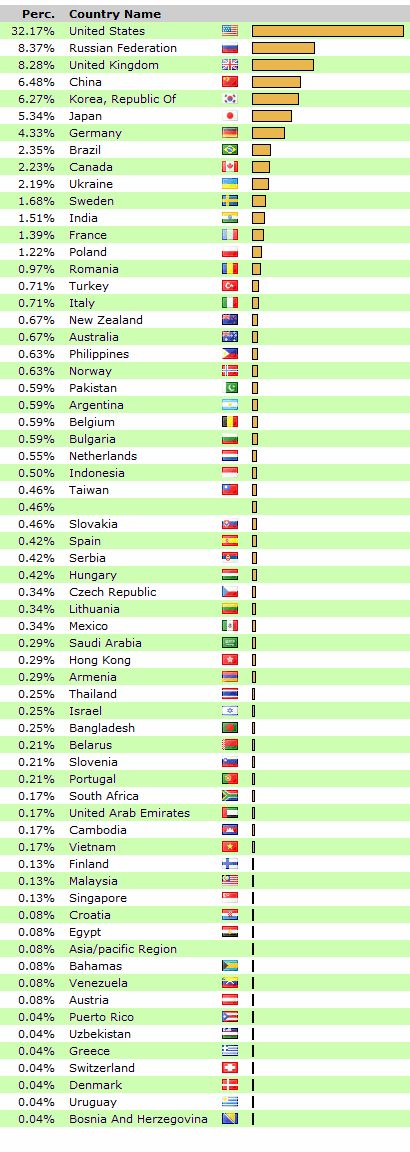
Worldwide interest, July 2010 ! I still receive an increasing interest to the MagicPicker Photoshop color wheel panel for Photoshop digital artists from all over the world! People come and download the panel from so many countries! And the statistics has changed from the last time I published it. Major part of digital artists moved to US! It's one third. The second place goes to Russia and the third to UK. Who goes next?
There are even artists from Saudi Arabia and Puerto Rico, who uses my Photoshop color picker!! Welcome :)
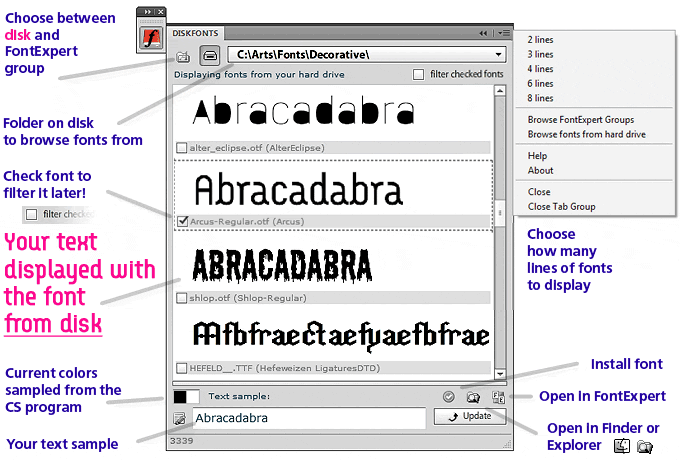
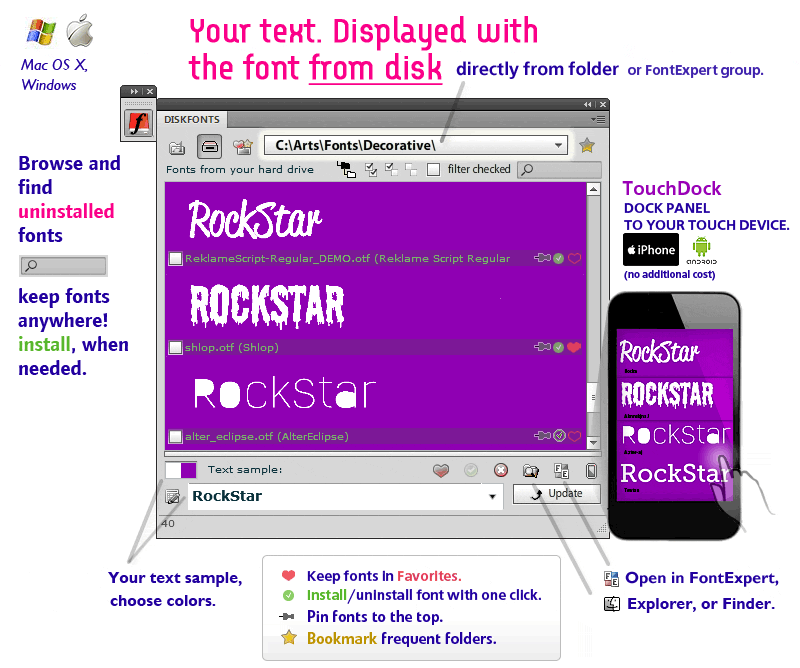
Font viewer (fonts from disk) inside Photoshop, Illustrator, InDesign and other Creative Suite CS5 progs
Now I'm ready with the new tool. It allows to view fonts from disk inside Creative Suite panel. Don't install fonts, now you can browse them from disk directly, quickly seeing, how your text looks like with different type faces with DiskFonts! This long awaited feature is finally here!
Supports Mac and Windows, x32 and x64, Photoshop, Illustrator, InDesign, Flash, Dreamweaver, Premiere, Fireworks! Is it Helvetica, Script font, open type font, truetype font - doesn't matter. Unlimited collection support. You can also compare fonts and then filter the fonts you like with one click.
I was thinking about this kind of thing for years! And now, after all hard work and bugs fighting it's been embodied in the form of a panel using the latest technologies proposed by Adobe CS5. It's dedicated to print designers, illustrators, desktop publishing lovers, prepress maniacs, flash animators, HTML5 geniuses and even video title makers!
new color is now displayed side by side with the old one, while changing
new Compact Mode for CS4 with only two colors visible and panel enlarges automatically when moving mouse around - activated from Menu -> Compact Mode
new "Switch Foreground and Background Colors" and "Default Foreground and Background Colors" buttons
for print designers - CMYK colors are now get profiled based on currently chosen Photoshop CMYK profile. Use it only when needed as it will slow down the panel
great speed improvement for H and S color modes when using Color Pane
minor bug fixes, including keyboard when using panel, registration and autocolor update when colors are exchanged ("x" key)
other small optimizations
Update is free for all who bought MagicPicker 1.0 Get it now!
Location: Los Angeles/San Francisco, California, United States
My photography is being kept at www.safari.am and flickr.
Some software tools at www.anastasiy.com
Some of my design is at www.paintplan.com
Some of my thoughts and images at blog.safari.am and my tweets are here: My Twitter
*If you'd like to buy my photoworks:
in USA please contact Ilya - ilya [at] anastasiysafari [dot] com
in Russia or Europe please contact Karine - karinera [at] rambler [dot] ru


 What's new: